South Korea is often called the “future of retail,” but for many travelers, that future can be intimidating. Imagine walking into a delicious-smelling Gimbap shop or a trendy pub, only to be met with total silence and a glowing screen instead of a waiter.
By 2026, the Self-Service Kiosk in Korea is no longer just a convenience—it is the gatekeeper. In a country rapidly shifting toward a “Mu-in” (Staff-free) economy, understanding these machines is as essential as carrying your passport. If you aren’t prepared, you might find yourself unable to order even a bottle of water.
Here is the essential survival guide to navigating Korea’s automated landscape like a local.

1. The “Mu-in” Era: Understanding the Staff-Free Revolution
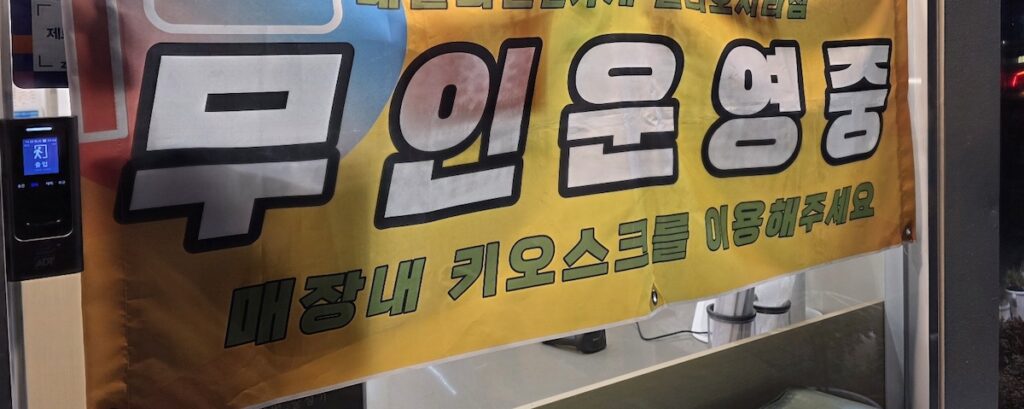
The first thing you must recognize is the sign “Unmanned Operation” (무인 운영 중).
- The Reality of 2026: Due to advanced Smart Retail Technology, many restaurants and cafes operate entirely without human staff during specific hours. The kiosk is your host, waiter, and cashier all in one.
- Don’t Panic: Seeing an empty counter doesn’t mean the shop is closed. It means the business has integrated a Cloud-based POS System to handle everything digitally. Look for the glowing kiosk screen—it’s ready for you.
2. Breaking the Language Barrier with the Self-Service Kiosk in Korea
The biggest fear for travelers is a screen full of Hangeul. However, Korea’s Self-Service Kiosk solutions have become incredibly global-friendly.
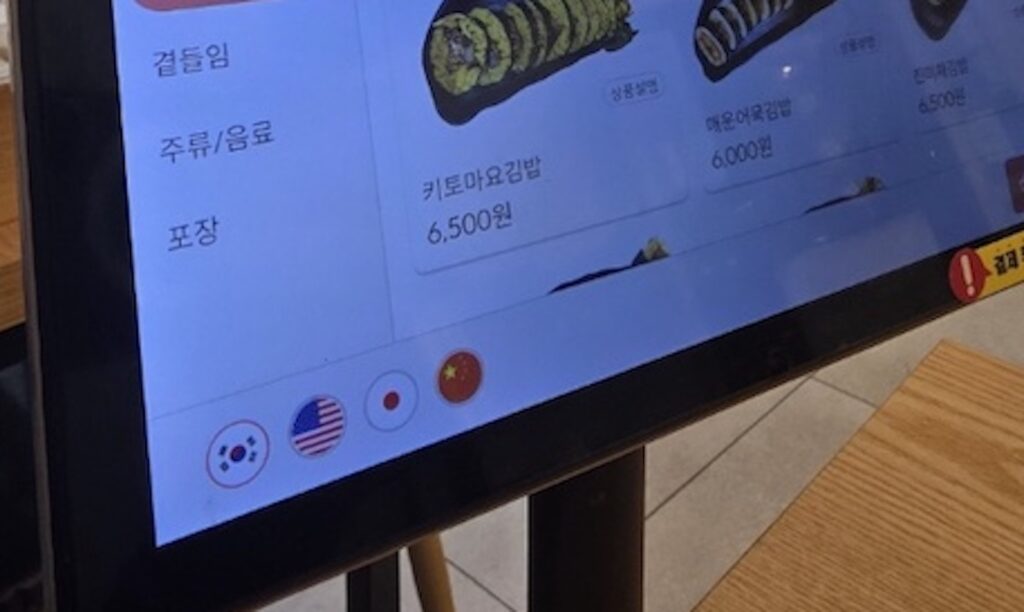
- One-Tap Translation: Almost every modern kiosk features a set of flag icons (USA, China, Japan) at the bottom or top corner. Tapping the English flag instantly converts the entire interface.
- Visual Menus: These machines use high-resolution images for every single item. This Digital Menu Board technology ensures that even if a translation is slightly off, you know exactly what you are ordering.
- Customization Made Easy: Want no onions? Extra spice? The kiosk allows you to select modifiers that are often harder to explain in a foreign language.
3. Table-Order Systems: The Pub and BBQ Evolution
It’s not just fast food anymore. In 2026, even traditional Korean barbecue joints and pubs (like the famous Crown Hof) have installed Tablet Order Systems at every individual table.
- Frictionless Ordering: You can browse the menu, see real-time stock updates, and order another round of draft beer without ever raising your hand to call a waiter.
- Integrated Payments: Most table-top tablets are now equipped with EMV-compliant card readers, allowing you to pay at your seat. This integration of Payment Gateway (PG) technology makes the dining experience seamless and fast.
4. Payment Essentials: Avoiding the “Transaction Failed” Error
The moment of payment is where most travelers get stuck. To ensure a smooth Self-Service Kiosk in Korea experience, you must know these technical details:
- IC Chip Priority: Korean kiosks are highly sensitive. Always insert your card with the chip facing up and into the machine.
- The Cashless Reality: 99% of unmanned stores are Cashless. They are built on Digital Payment Infrastructures that only accept credit cards, Samsung Pay, Apple Pay, or local T-Money cards. If you only have cash, you may be unable to complete your purchase.
- Contactless Boom: In 2026, NFC-based payments are everywhere. If your card has the “wave” symbol, you can often just tap the reader, thanks to the widespread adoption of Contactless Payment Terminals.
5. Troubleshooting: What to do when the Machine Says No
- Foreign Card Issues: Sometimes, a kiosk might reject a foreign-issued card. Always carry a secondary card (Visa/Mastercard) or have your mobile wallet set up as a backup.
- The “Call” Button: Most kiosks have a small “Help” or “Call” icon. Tapping this usually alerts a remote manager who can assist you via intercom or even control the screen remotely.
Quick Troubleshooting Guide for Kiosks
| Issue | Potential Cause | Solution |
| Transaction Failed | Card chip error or direction | Re-insert with the chip facing up and wait for the beep. |
| Language Confusion | Default set to Korean | Look for the Flag Icons (USA/UK) at the bottom corner. |
| Cash Rejected | “Mu-in” (Unmanned) policy | Most stores are Cashless. Use a credit card or Apple Pay. |
| Menu Not Found | Sold out or specific hours | Check the “Sold Out” badge or ask the remote manager. |
Don’t Stop Here! Essential Prep for Your Korea Trip
Mastering the kiosk is just one part of your digital survival in Korea. To ensure a completely stress-free experience from the moment you land, check out these highly recommended guides:
- 📱 [Your Phone Works in Korea 2025 — How to Use SIM, eSIM & Roaming on Any Device] – You can’t use a kiosk if your phone doesn’t have data. Get your internet sorted before you fly.
- 💳 [Best Banks for Foreigners in Korea (2025 Edition)— A Complete Guide to Opening, Using, and Choosing the Right Bank as an Expat] – Since most kiosks are cashless, knowing which local cards work best will save you from constant “Transaction Failed” errors.
- 🏦 [The Complete Guide: How to Own and Manage a Korean Bank Account While Living in America (2026 Edition)] – Planning a longer stay or managing finances from abroad? Learn how to keep your Korean bank account active even if you’re in the U.S.