Self-service kiosks in Korea are the silent gatekeepers of modern Seoul, and I’ll admit, standing in front of one at my local Mega Coffee around 3 PM still gives me a slight wave of anxiety. It’s that specific time when school lets out, and suddenly I’m flanked by dozens of middle schoolers who navigate touchscreens faster than I can blink. My biggest fear isn’t just picking the wrong syrup; it’s the quiet judgment of the digital-native teenagers behind me, watching as I fumble with the “Pay” button and delay their afternoon caffeine fix.
If you’re a first-time visitor, this isn’t just about social pressure—it’s a genuine barrier. In a city where “Pali-pali” (hurry-hurry) is the law of the land, these machines can feel like a high-stakes exam. But after living here, I’ve realized that mastering these kiosks is the ultimate master key to surviving and enjoying life in Seoul.
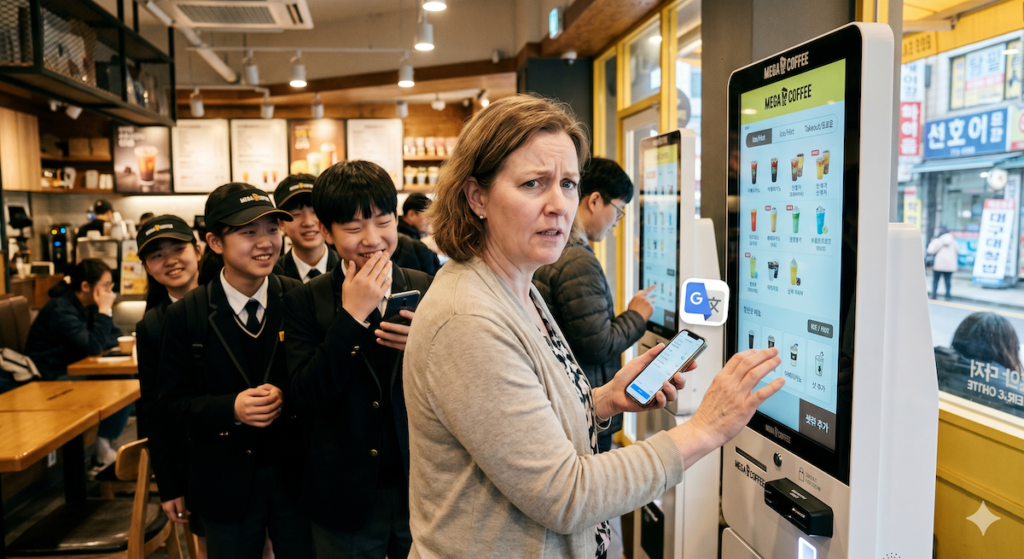
Why Self-Service Kiosks in Korea Feel Like a Final Boss
The transition to digital ordering in Korea has been aggressive. From tiny gimbap shops in Mangwon to high-end cafes in Gangnam, the “Kiosk First” policy is everywhere. For a traveler, the challenge is three-fold: the language, the complex menu layers, and the unique South Korean payment ecosystem.
The Language and Menu Maze
Even if a machine has an “English” button (which is often hidden in a tiny corner), the translation is frequently incomplete. You might find “Americano” in English, but the crucial options like “Less Ice” or “Takeout vs. Store Use” often revert to Korean. It’s easy to accidentally order a boiling hot drink in the middle of a humid August afternoon because you clicked the first red button you saw.
The High-Speed Payment Wall
Korean kiosks are designed for local credit cards and mobile easy-pay systems like Samsung Pay or Kakao Pay. When an international card takes an extra three seconds to process, the machine sometimes times out, forcing you to start the whole embarrassing process over again while the line behind you grows.
How to Beat the Kiosk System
| Step | Action Strategy | Why It Works |
| 1. The Scan | Take a photo of the physical menu first | You can translate the menu without the machine timing out. |
| 2. The App | Use Google Lens / Papago Live Translation | Real-time AR translation lets you read the screen in English. |
| 3. The Search | Look for the Globe Icon 🌐 | This is the universal symbol for language settings in Korea. |
| 4. The Timing | Avoid the 12 PM – 1 PM rush | Lower pressure allows you to explore the menu sub-layers. |
A Personal Mission: Training for the Digital Future
My struggle with kiosks isn’t just about my own coffee runs. On weekends, I make it a point to take my 70-year-old mother to a small shop in our apartment complex. We ignore the staff and walk straight to the machine. I watch her hands hover over the screen, hesitant and shaky, as she tries to figure out where the “Add Shot” button is.
I do this because I’ve realized that in 2026, being unable to use a kiosk in Seoul is a form of social isolation. If you can’t use the machine, you can’t eat at the trendy new burger spot or buy a train ticket. Helping her navigate that interface is my way of making sure she isn’t left behind in a city that is moving toward a staff-less future. It’s a steep learning curve, but once she successfully printed her first receipt, the look of digital independence on her face was worth every minute of practice.
The “Critical Zone”: Survival When the Kiosk Wins
While fumbling at a cafe is embarrassing, getting stuck at a kiosk in a high-stakes environment like an airport, a bank, or a subway station can be genuinely distressing. These are the moments where “I’ll just try again” isn’t an option because you have a flight to catch or a train to board. In these cold, metallic terminals, the lack of a human face makes the digital barrier feel like a wall.
When to Wave the White Flag
If you’ve tried the machine twice and it still hasn’t accepted your payment or issued your ticket, stop. Don’t let the “Pali-pali” pressure force you into a mistake. In Korea, even in the most automated stations, there is always a “Help” protocol designed for these exact moments.
How to Get Human Help Fast
- The “SOS” Button: Look for a red or yellow button labeled “Help” (도움) or an icon of a telephone handset on the side of the machine. At subway ticket gates, this often connects you directly to a station master.
- The Magic Phrase: If you manage to find a staff member but your Korean is non-existent, use this simple phrase: “Kiosk-ga andwaeyo” (The kiosk isn’t working) or simply point and say “Help me, please.” 3. The Concierge Desk: In Incheon Airport or major KTX stations, look for the “Information” (안내) desk rather than the ticket line. They are trained to handle travelers who are struggling with the automated systems and can often process your request manually.
Staff Assistance Quick-Guide
| Location | Common Issue | Where to Look for a Human |
| Incheon Airport | Bag drop / Check-in error | The “Overseas Traveler Support” desk near the Kiosks. |
| Subway Station | Card not tapping / Reload error | The small “Gate Helper” booth or the SOS button on the gate. |
| Major Banks | ATM card rejection | Press the “Staff Call” (직원 호출) button on the ATM screen. |
| KTX Stations | Standing room only / Sold out | The physical ticket window (창구) usually has one “English Speaking” lane. |
Survival Tips for Your First Kiosk Encounter
If you find yourself facing a screen and a line of impatient locals, follow these simple field rules to keep the “Pali-pali” spirit alive:
Prepare Your Card in Advance
Don’t wait until the final screen to start digging through your bag for your wallet. Have your physical card or Apple Pay/Google Pay (where accepted) ready in your hand. Most Korean kiosks have the card reader at the bottom right. Insert your card and leave it there until the receipt starts printing.
Look for the English Toggle Early
Before you even touch a menu item, look at the very top or very bottom of the screen. You are looking for “English” or the 🌐 icon. If you don’t see it, open your translation app immediately. Most kiosks follow a standard flow: Select Menu -> Select Options (Ice/Sugar) -> Cart -> Order -> Eat In/Take Out -> Payment.
Know the “Takeout” Rule
Since 2022, Korea has strict laws about single-use plastics. The kiosk will almost always ask if you are “Eating In” (매장) or “Taking Out” (포장). If you select “Eating In,” they will give you a glass or mug. If you take that mug outside, the shop can get a massive fine. If you plan to leave, always select the “Takeout” option.
Conclusion
Mastering self-service kiosks in Korea is more than just a convenience—it is an essential survival skill for navigating the most tech-forward city in the world. While the speed of the local crowd and the complexity of the screens can be intimidating, remember that even locals feel the pressure. Whether you are a traveler trying to grab a quick latte in Hongdae or someone helping their elderly parents stay connected to the world, the goal is the same: digital independence. Take a breath, have your translation app ready, and don’t be afraid to take your time. Once you conquer the kiosk, the entire city of Seoul opens up to you.